

TimeBoost by BuzzBrain
Do the jobs. BuzzBrain handles the rest.
From the first enquiry to the final invoice, TimeBoost brings your quotes, scheduling, jobs, customers and money together, with an AI assistant to help you stay on top of the day.
- Freeduring approved private beta testing
- First month freeafter commercial release
- Then $139+ GST/month
Private beta now · iPhone and iPad, with a desktop layout
Real screenA TimeBoost quote, explained.
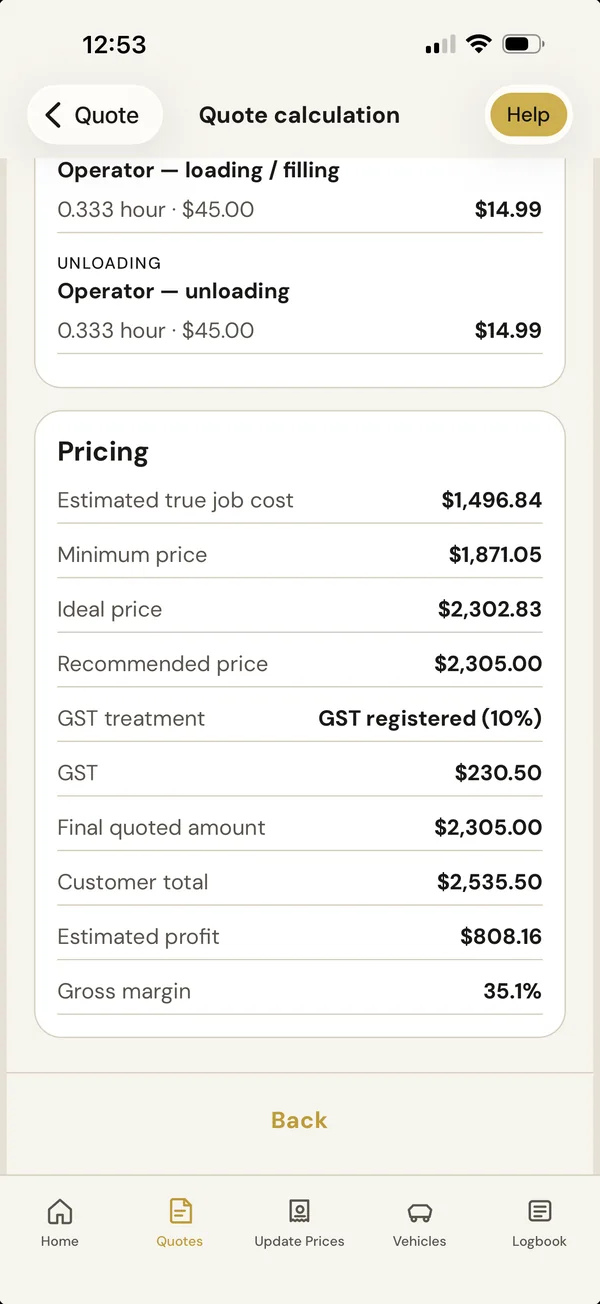
- Estimated true job costTrue job costEvery cost, added up.
- Recommended priceRecommended priceYour margin applied.
- Estimated profit and gross marginProfit and marginBefore you send it.
- What it is
- AI-powered job and business management: enquiries, quotes, scheduling, jobs, customers, invoices and payments in one place.
- Who it's for
- Australian owner-operators, micro businesses and small service teams.
- What it costs
- Free during approved private beta testing. First month after commercial release is free, then $139/month + GST.
- How to start
- Apply for private beta testing. We review applications and help you set up.
How TimeBoost works
From setup to business insights.
Set your business up once. TimeBoost then carries each job from the first enquiry to getting paid, and shows you how the business is going.

How TimeBoost works
- Business setup: manage services, products, suppliers, rates and team settings.
- Enquiries and customers: organise leads, customer details and follow-ups.
- Costs and quotes: calculate labour, materials, vehicles and equipment, create quotes and understand margins.
- Scheduling and preparation: plan jobs, organise the day, prepare materials and assign work.
- On the job: record notes, photos, time, actual costs and extra work.
- Invoices and payments: create invoices and track deposits, payments and outstanding amounts.
- Business insights: review job profitability, reports, customer history and useful reminders.
What TimeBoost does
Less admin. Know what needs you.
TimeBoost shows you what needs attention, keeps every job moving and remembers how your business works. You stay in charge of every price and every decision.
Your Day, Sorted
See today's jobs, what needs your attention and what's coming up next, all in one place. TimeBoost helps you stay organised, keep work moving and focus on getting the job done.
Enquiries into paying work
Keep enquiries together, see which need a quote or follow-up, and track them through to booked work.
Smarter scheduling
Plan the day around real travel time. When something changes, TimeBoost helps you rework it.
Everything you need on the job
Start the job, capture what happens as you go and finish once, without a pile of paperwork afterwards.
Know your customers
Customer records, site details and Business Memory keep what you'd otherwise have to remember.
Get paid and stay in control
Invoices come straight from the job and the quote. Record deposits and payments and see what's still owed.
Your team, organised
Organise your team and assign work. Confirm shared staff access and permissions for your beta version.
Your AI assistant
An assistant throughout TimeBoost. Type a question in plain English for help with the job or task on screen.
Work your way
Phone on the job, tablet in the ute, the bigger screen in the office. TimeBoost fits the screen you're using.
Connect your tools
Quoting, invoicing and payment recording are built in, so accounting software is optional.
See everything TimeBoost does, part by part
Your Day, Sorted
- Home shows today's work, your next job and the things that need your attention, such as quotes to follow up, jobs to finish and invoices to send.
- Know which job is next, with the customer and job details kept together.
- My Day shows your daily work and assigned jobs.
- Call, message or get directions from the relevant job.
- Catch Me Up brings you up to speed on what happened while you were busy or away.
- Less time organising, more time doing the work.
Enquiries into paying work
- Leads keep enquiries in one place and show their progress from first contact to booked work.
- Job costing works out the true cost from your own labour, travel, vehicle, machinery and material costs, then applies your margin.
- Your products, suppliers and quote templates are ready to reuse, and a quote can include options for the customer.
- Pricing intelligence uses your own costs and jobs to point out where a price may be too low. You decide.
- When a customer accepts, TimeBoost tracks the acceptance, any deposit and part-payments as the job moves to booked work.
Smarter scheduling
- Calendar and scheduling for the day, the week and each job. Google Calendar is an optional integration; live connection is not yet verified for the current beta.
- Travel distance, travel time and directions to each job.
- Plan work around appointments and travel. Build My Day helps you plan and organise the day's schedule. Repair My Day finds scheduling conflicts and suggests changes, which you review before anything is applied.
- Weather for each job location, so you can plan outdoor work. TimeBoost doesn't cancel or reschedule anything for you.
Everything you need on the job
- Start Job and Active Job keep the job in front of you while you work, with site access, notes and the work to do.
- Smart Capture records the actual hours, materials and photos as you go.
- Quick Add Extra adds extra labour, materials or another load to the final invoice without changing your standard prices.
- Finish Job brings recorded time and costs, extra work, photos and the invoice together in one place.
- Purchase and packing lists help you take the right materials and gear.
- Your vehicles and machinery are part of the true cost of each job.
Know your customers
- Customer records with contact details, sites and past jobs.
- Site details keep access notes, gate codes and instructions for each address.
- Business Memory remembers how your business works: your costs, prices, job types, customers and sites. It suggests. It never changes your prices or settings without you.
- Return visits and repeat work carry the customer, location and agreed prices forward.
- Customer retention prompts help you stay in touch with past customers. You choose what to do.
Get paid and stay in control
- Built-in invoicing: invoices are created from the job and the quote, with your business and ABN details, line items and GST.
- Deposits, payments and part-payments are recorded against the job.
- Outstanding balances show what is still owed.
- Job profitability compares estimated and actual time, costs and profit, and reports show how the business is tracking.
- TimeBoost records payments. It doesn't take card or online payments itself.
Your team, organised
- Workforce keeps your team in one place.
- Roles and assignments put the right person on each job.
- Access to prices and financial details depends on the roles supported by your beta version. Confirm permissions before giving staff access.
- My Day organises assigned work. Shared staff access is subject to beta availability; shared workspace sync is not enabled.
Your AI assistant
- A personal assistant that is available throughout TimeBoost.
- Ask questions and get help in plain English by typing.
- It suggests a next step based on what is on screen. You confirm before anything changes.
- It flags what needs your attention and makes recommendations.
- Give it a name and choose its personality and response style. That changes how it talks to you, never what is true.
- Safe Automations set up routine admin steps once, with you in control.
Work your way
- iPhone and iPad.
- A desktop layout for the bigger screen in the office.
- Holiday Mode for when you're away from the business.
- Shared workspace sync is not enabled in the current beta.
Connect your tools
- Google Calendar: optional integration; live connection is not yet verified for the current beta.
- Google Maps: destinations, travel time and directions.
- Weather for each job location.
- Xero: optional accounting integration in development; live connection is not yet verified.
- QuickBooks Online: optional accounting integration in development; live connection is not yet verified.
- You don't need accounting software to use TimeBoost. Quoting, invoicing, deposits and payment recording are built in.
TimeBoost records payments. It doesn't process card payments itself. Xero and QuickBooks Online integrations are optional and in development. Live connections are not yet verified for the current beta. See the Roadmap →
- Shared workspace sync: not enabled in the current beta
- Android: join the waitlist for release availability
- Customer online acceptance links: not available in the current beta
- Online payments from customers
- Optional Xero and QuickBooks Online integrations: in development; live connections not yet verified
- Automatic texts and emails to customers through connected services
- An automatic hand-off from BuzzBrain Reception
- Spoken assistant replies: not available in the current beta
Your costs
See the true cost. Then price it.
Set up your costs once. TimeBoost adds them up on every job, applies your margin and shows a recommended price, GST, profit and margin, with a clear "Why this price?". The screen at the top of this page is a real example.
We do the maths. You make the decision.
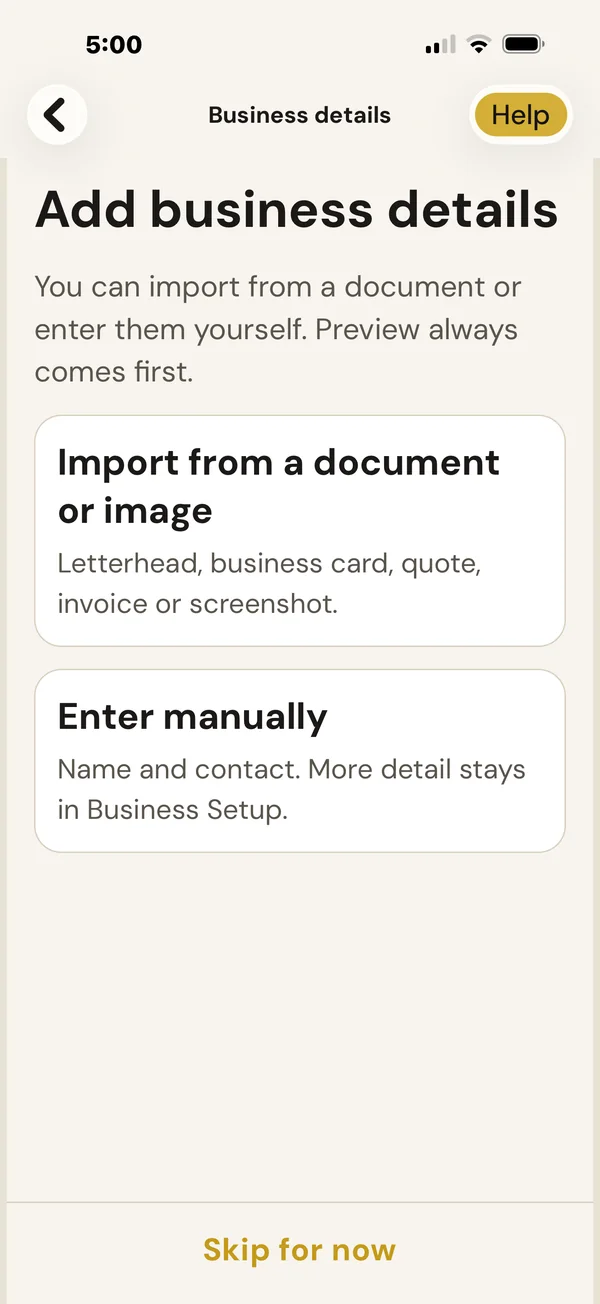
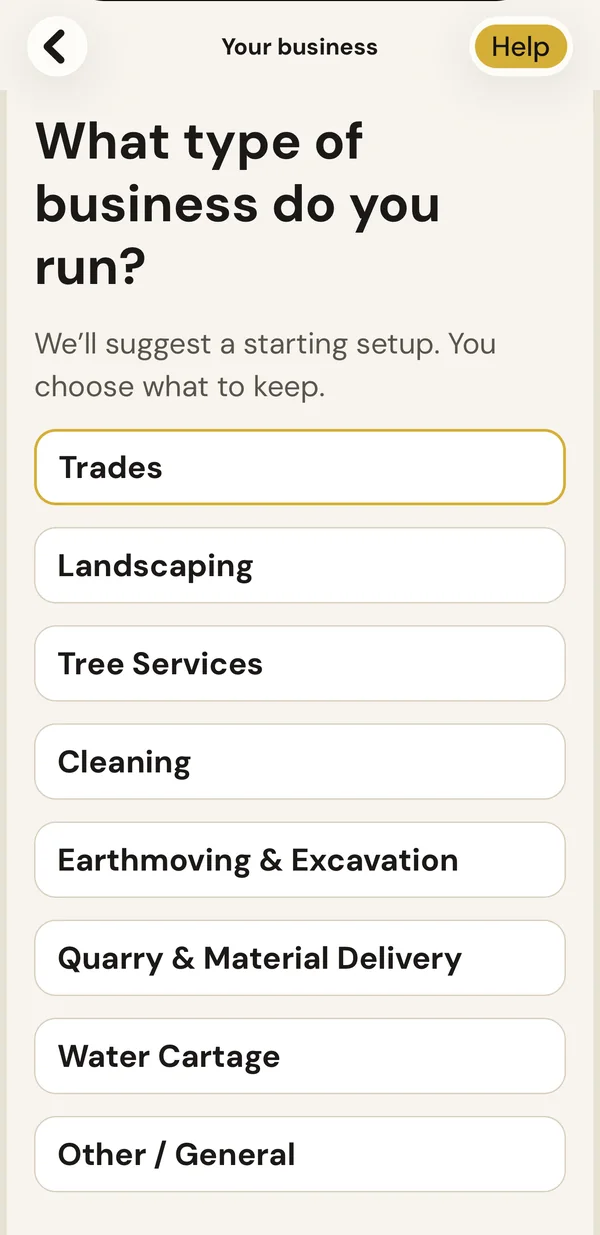
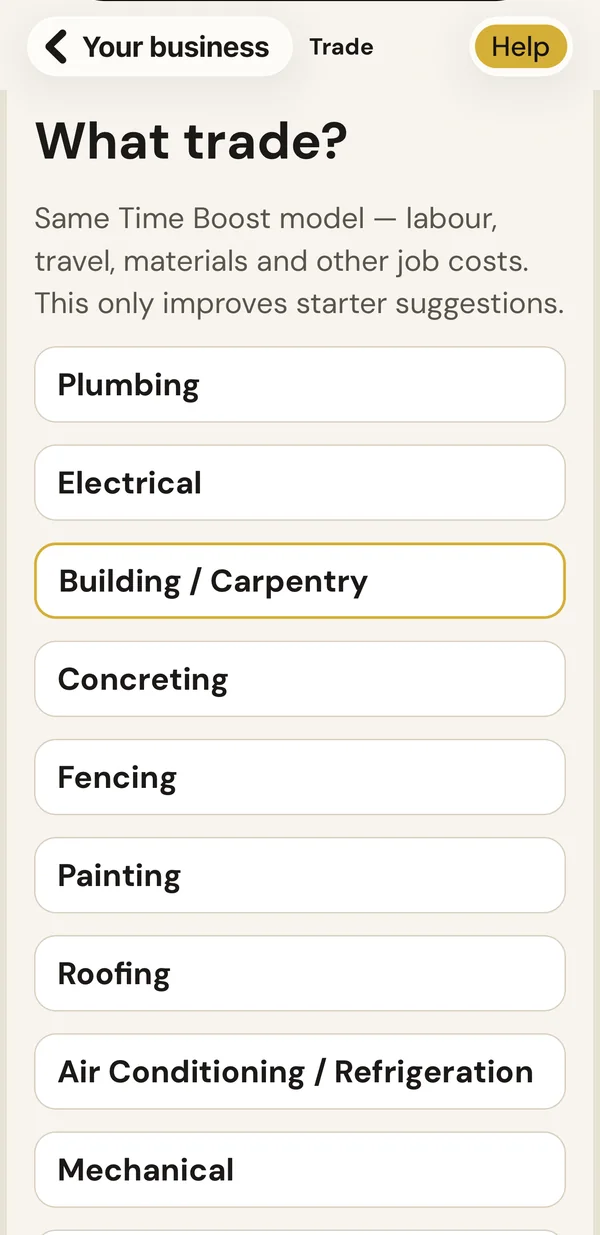
Tell TimeBoost your type of business and trade and it suggests a starting setup. Keep what fits and add your real costs and margin. Do it yourself, or we can help you set it up.
See the real setup and cost screens
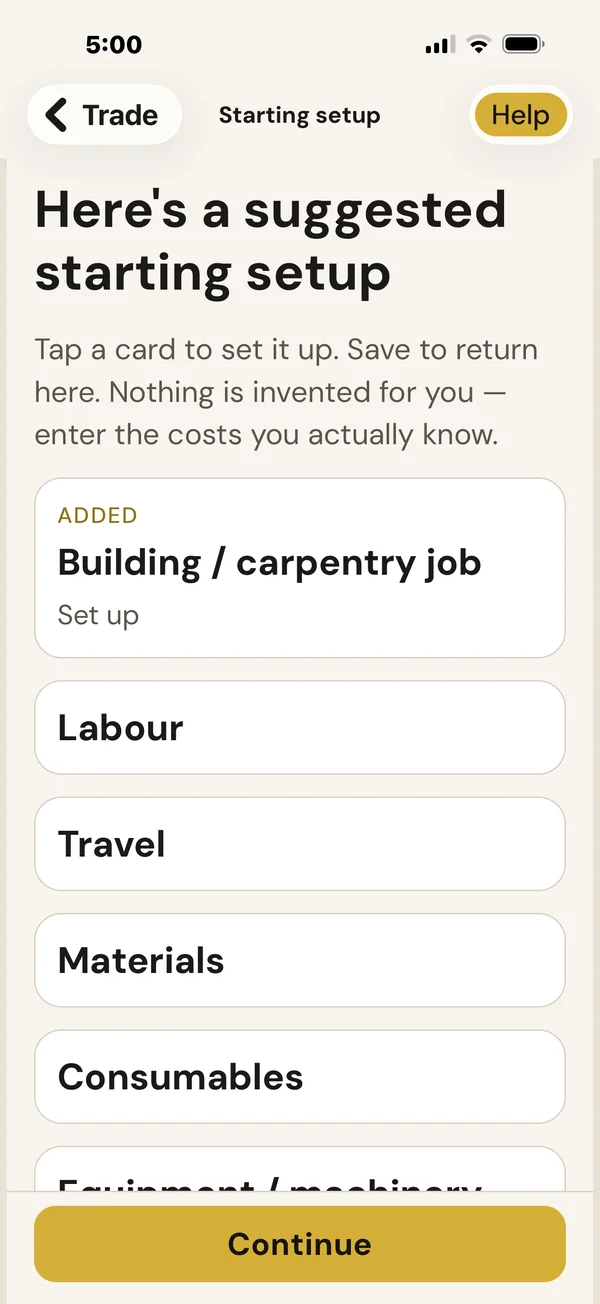
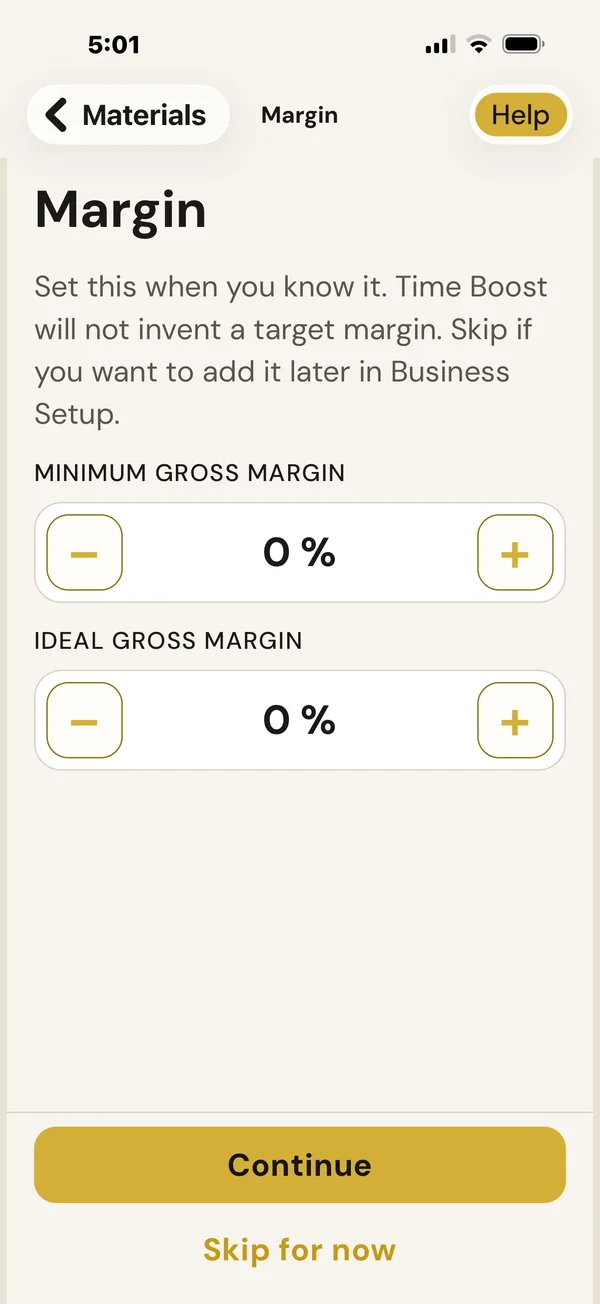
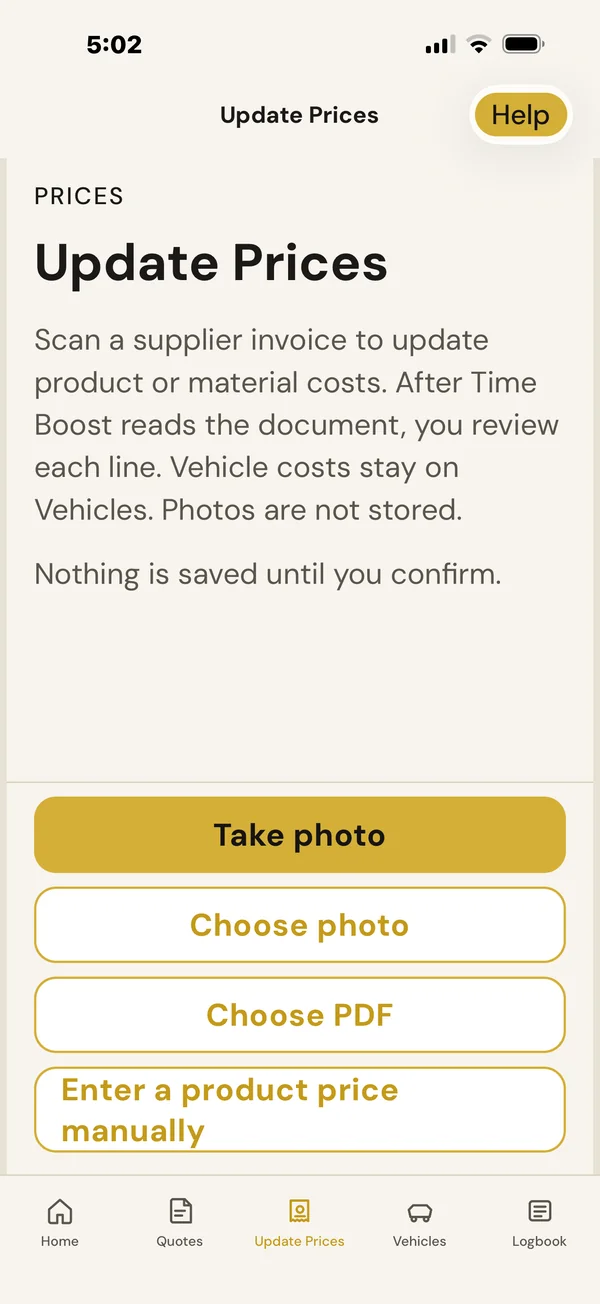
Who it's for
Built for businesses that price every job.
Owner-operators, micro businesses and small service teams. If you price and run individual jobs, TimeBoost is built for you. Not just trades.
Explore all 18 business types

Building & Carpentry 
Plumbing 
Electrical 
Concreting 
Fencing 
Painting 
Roofing 
Air conditioning & refrigeration 
Mechanical 
Landscaping 
Arboriculture & tree services 
Earthmoving, excavation & civil 
Rural contracting 
Cleaning 
Property & maintenance 
Quarry & material delivery 
Water cartage 
Other job-based services
Building & Carpentry · 1 of 18
Pricing
Free during private beta.
- Freeduring approved private beta testing
- First month freeafter commercial release
- Then $139+ GST/month
What it gives you back
- Less admin every week
- Extras that make it onto the invoice
- Jobs priced from your real costs
$139 + GST/month is about $32.08 a week.
 BuzzBrainTimeBoost
Free during private beta
For approved beta testers. Places are limited. See the TimeBoost Terms of Use and the Terms & Conditions.
FAQ
TimeBoost questions. Answered.

TimeBoost, the beta and your data
8 questions
What is TimeBoost?
TimeBoost by BuzzBrain is AI-powered job and business management software for Australian trades and service businesses. It brings your enquiries, quotes, scheduling, jobs, customers, invoices and payments together, with an AI assistant to help you stay on top of the day. You do the jobs. BuzzBrain handles the rest.
Who is TimeBoost designed for?
Australian owner-operators, micro businesses and small service teams that price and run individual jobs. That includes plumbing, electrical, building and carpentry, landscaping, tree services, earthmoving, cleaning, property maintenance, quarry and material delivery, water cartage and other job-based service businesses.
Is TimeBoost Australian?
Yes. TimeBoost is made by Buzz Business Boosters, an Australian business based in New South Wales. It's built around how Australian businesses price and run work, including GST, and it's priced in Australian dollars.
What does TimeBoost cost?
Approved beta testers use it free during private beta testing. First month after commercial release is free, then $139/month + GST.
What happens during private beta?
TimeBoost is being tested with a small group of Australian businesses before launch. Approved beta testers use it free in their real business and tell us what works and what doesn't. Features may change as we improve it. Places are limited, so not everyone who applies is accepted.
What devices does TimeBoost work on?
The private beta runs on iPhone and iPad, and TimeBoost has a desktop layout for the bigger screen. The Android app is on the way: if you only use Android, you can join the waitlist on the application form. Live syncing of one business across phone, tablet and desktop is coming.
Where is my business data stored?
See the Privacy Policy for how TimeBoost stores and protects your information today, and how that changes as the shared cloud workspace arrives.
Can BuzzBrain help me set it up?
Yes. You can set TimeBoost up yourself, or we can help. Tell TimeBoost your type of business and trade and it suggests a starting setup. Keep what fits and add your real costs and margin.
Leads, quotes and pricing
7 questions
Can TimeBoost manage my leads and enquiries?
Yes. Leads keep enquiries in one place and show which are new, quoted or booked, so you can see what needs following up.
How does TimeBoost work out what to charge?
It works out the estimated true cost of a job from your own rates for labour, vehicles and travel, materials, machinery and anything specific to the job. Then it shows a recommended price, GST, estimated profit and margin, with a clear "Why this price?" explanation.
Does it decide the price for me?
No. It recommends a price based on your own costs and margin and explains how it got there. You decide the final price.
Will TimeBoost change my prices by itself?
No. Business Memory and pricing intelligence can point things out, but TimeBoost never changes your prices or settings without you. Updated supplier costs are saved only after you review each line.
Can I give customers options on a quote?
Yes. A quote can include options, so the customer can choose what suits them. Your products, suppliers and quote templates are ready to reuse.
Can customers accept a quote and pay a deposit online?
TimeBoost tracks when a customer accepts a quote, and records deposits and part-payments against the job. Online acceptance links and online payments for your customers are still to come. TimeBoost doesn't take card payments itself.
Can I charge one customer a different price without changing my standard price?
Yes. You can change the price of an item on one quote. For example, your standard rate might be $285 and this customer's price $250. The $250 applies only to that job, and your standard price stays the same.
Scheduling and the working day
4 questions
What does TimeBoost show me each day?
Home shows today's work, your next job and the things that need your attention, like quotes to follow up and jobs ready to invoice. My Day shows your daily work and assigned jobs. Customer and job details stay together, and you can call, message or get directions from the job.
Can TimeBoost plan my day?
Yes. Build My Day helps you plan and organise the day's schedule around appointments and travel. When something changes, Repair My Day identifies scheduling conflicts and suggests changes. You review them before anything is applied.
Does it work with Google Calendar and Google Maps?
TimeBoost provides destinations, travel time and directions for each job. Google Calendar is an optional integration intended to show busy times alongside your jobs; live connection is not yet verified for the current beta.
Does TimeBoost show weather for scheduled jobs?
Yes. It shows the weather for the location of each scheduled job, not just where you are. Forecasts can change, so treat it as a guide. TimeBoost doesn't cancel or reschedule jobs for you.
On the job and getting paid
6 questions
What does TimeBoost do on the job?
Start the job and TimeBoost keeps the details in front of you: site access, notes and the work to do. Smart Capture records the actual hours, materials and photos, Quick Add Extra adds anything extra to the final invoice, and Finish Job wraps it up in one pass.
Can TimeBoost create invoices?
Yes. Invoicing is built in, so you don't need accounting software to invoice. Invoices are created from the job and the quote, with your business and ABN details, line items and GST, so nothing is rebuilt.
Can I record deposits and payments?
Yes. Record deposits, payments and part-payments against the job and see what's paid and what's still owed.
Does TimeBoost take card payments?
No. TimeBoost records payments and shows what's outstanding. Online payments from customers are still to come.
Does TimeBoost show actual job profit?
Yes. Compare estimated with actual time, costs and profit for each job, and use the reports to see how the business is tracking.
Can TimeBoost send review requests after a job?
Yes, with you in control. After a completed job, TimeBoost can prepare a review request with your review link and an editable message, and you choose when to send it from your own phone. BuzzBrain Reviews is a separate product.
Customers, team and your AI assistant
5 questions
What is Business Memory?
Business Memory is how TimeBoost remembers the way your business works: your costs, prices, job types, customers and sites. It saves you re-entering things and helps it make useful suggestions. It never changes your prices or settings without you.
Can I manage staff in TimeBoost?
You can plan your team and assign jobs. Confirm staff access and permissions for your beta version before relying on them. My Day organises assigned work. Shared staff access is subject to beta availability; shared workspace sync is not enabled.
What can the TimeBoost AI assistant do?
It's a personal assistant available throughout TimeBoost. Ask it questions in plain English, let it suggest the next step for what's on screen, and it will flag what needs your attention. You can give it a name and choose its personality and style.
Can I talk to the assistant?
The assistant works by text today. Spoken voice is still to come.
Does the AI make decisions for me?
No. The assistant suggests and explains. Anything that changes your prices or your jobs is shown to you to confirm.
Accounting and connections
4 questions
Do I need accounting software to use TimeBoost?
No. Quoting, invoicing, deposits and payment recording are built into TimeBoost, so you can run it on its own.
Can TimeBoost connect with Xero or QuickBooks Online?
Xero and QuickBooks Online integrations are optional and in development for businesses that use them. Live connections are not yet verified for the current beta. You can quote, invoice and record payments in TimeBoost without either service.
Does it replace my accounting software?
Not entirely. TimeBoost handles leads, quoting, scheduling, jobs, invoicing, payment status and job results, so you don't need accounting software to run the work. It isn't full bookkeeping or accounting software.
Does TimeBoost work with BuzzBrain Reception?
They're separate products that work well together. BuzzBrain Reception captures the details of each enquiry. TimeBoost carries the work forward: cost, quote, schedule and invoice the job. During private beta, BuzzBrain sets up the hand-off with you. An automatic hand-off is still to come.
Want to try TimeBoost in your own business?
Apply for beta testing →